
There is a specific kind of adrenaline rush we chase here at MyTechLogs Labs. It’s not buying the newest, fastest hardware the day it comes out. Anyone with a credit card can do that. No, the real rush comes from finding elite, enterprise-grade gear that the industry has discarded because it’s “incompatible” with normal computers, and forcing it to work through sheer technical stubbornness.
Last week, I was browsing surplus server equipment listings when I spotted it: a massive 7.68TB Enterprise Class Solid State Drive. These drives are legends. They have endurance ratings measured in petabytes, capacitors for power-loss protection, and controller chips designed for 24/7 datacenter hammering. They also retail for over $2,000.
This one was listed for $150 as “Untested/For Parts.” The seller’s note was brief: “Pulled from decommissioned server. Won’t power up in standard desktop. Sold as-is.”
I knew exactly what that meant. It wasn’t broken. It was just misunderstood.
When the drive arrived, I plugged it into the Lab’s main test bench using a standard SATA power connector. I hit the power button. The fans spun up, the BIOS posted, but the drive was invisible. It didn’t even get warm. To a normal user, it was a dead brick.
But this is a classic symptom of a deliberately engineered incompatibility between server hardware and consumer power supplies known as the “Power Disable” feature. The industry doesn’t want you using these cheap surplus drives in your gaming PC. They want you to buy new consumer drives.
In this post, I’m going to show you how I defeated this billion-dollar industry segmentation strategy using a microscope, a steady hand, and a tiny sliver of Kapton tape that costs less than a penny.
The “Power Disable” Conspiracy: Why Server Drives Play Dead
To understand this hack, you need a quick lesson in the evolution of SATA power connectors. Your standard desktop power supply has SATA connectors with 15 pins. For years, these pins provided three voltage rails: 3.3V, 5V, and 12V.
Almost no modern consumer SSDs use the 3.3V rail anymore; they run entirely off 5V. So, on most modern consumer power supplies, the 3.3V wires are still there, pumping power, but they go unused.
Enter the enterprise datacenter. Server administrators needed a way to hard-reset a frozen drive without physically walking to the server rack and pulling it out. The standards body (SATA-IO) came up with a solution in revision 3.3 of the specification. They repurposed Pin 3 of the SATA power connector.
In the old days, Pin 3 was part of the 3.3V power delivery. In the new enterprise standard, Pin 3 is the “Power Disable” (PWDIS) signal. If a drive detects voltage on Pin 3, it interprets it as a command from the server to shut down immediately.
Here is the conflict: When you plug this enterprise drive into a consumer gaming PC power supply, that PSU is dutifully sending 3.3 Volts straight down Pin 3, because it thinks it’s powering an old drive. The enterprise drive sees that voltage, thinks a server admin is telling it to stay offline, and refuses to boot.
It’s a perfect deadlock caused by older consumer standards clashing with newer enterprise standards.
The Lab Solution: Isolation, Not Destruction
There are brute-force ways to fix this. You could take wire cutters to your PC’s power supply unit and snip the 3.3V orange wire leading to the SATA connector. That works, but it’s destructive. If you ever need that cable for something else later, you’re out of luck.
At MyTechLogs Labs, we prefer surgical precision over brute force. We don’t want to break the power supply; we just want to blind the drive to that specific signal.
The solution is to physically isolate Pin 3 on the drive’s connector so it never makes electrical contact with the power cable. If Pin 3 doesn’t see voltage, the drive assumes it’s allowed to turn on.
The Surgery: Applying the “Kapton Bypass”
This sounds easy, but the execution requires extreme patience. SATA pins are incredibly tough, but they are also narrow and spaced tightly together.
The Tools:
- Kapton Tape (Polyimide Film): This is essential. You cannot use standard electrical tape or scotch tape. They are too thick, their adhesive gets gummy when heated, and they can tear inside the connector. Kapton is extremely thin, highly electrically insulative, and heat resistant up to 400°C.
- Precision Tweezers: Curved anti-static tweezers are best.
- Magnification: A digital microscope or a high-power jeweler’s loupe.
- X-Acto Knife with a fresh #11 blade.
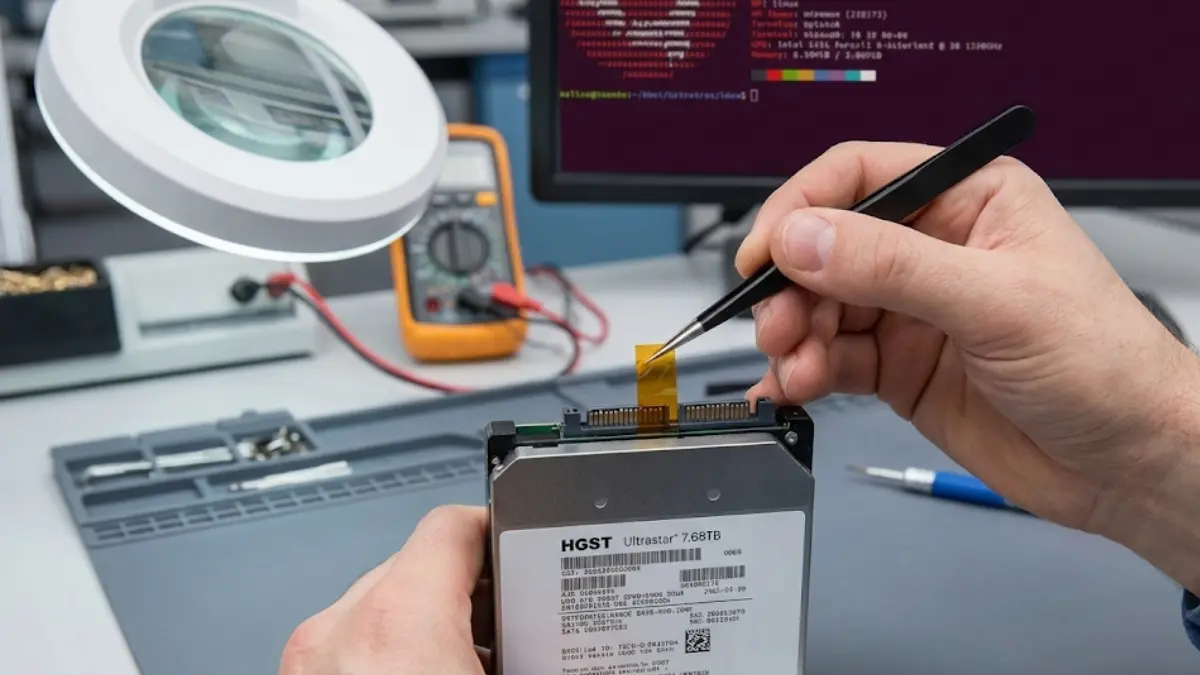
I placed the 8TB behemoth under the lab microscope. The power connector has a longer “L” shape segment. The first three pins on the left side of this segment are Pins 1, 2, and 3. They used to all be 3.3V bonded together. Now, Pin 3 is the enemy.
I cut a sliver of Kapton tape that was impossibly small—perhaps 1.5mm wide and 4mm long. The challenge is placing this sliver so that it perfectly covers only the third golden contact pin.
If the tape is too wide and covers Pin 4 (Ground), the drive might have grounding issues. If the tape is crooked and doesn’t fully cover the back of Pin 3, the spring-contact in the power cable might still touch it, and the hack will fail.
It took me four attempts. My hands, which are usually steady enough for micro-soldering, felt clumsy at this scale. On the final attempt, using the tweezers under 20x magnification, I slid the Kapton sliver perfectly over Pin 3, wrapping it slightly over the top edge of the plastic connector to ensure it wouldn’t slide off when the cable was inserted.
The Verification Log Box
I mounted the drive back into the test bench. I plugged in the exact same SATA power cable that had failed an hour earlier. I took a deep breath and hit the power button.
I didn’t just watch the screen; I put my hand on the metal casing of the drive. Within five seconds, I felt the subtle vibration of power flowing and the warmth building near the controller.
I booted into our Linux diagnostic environment and pulled up the terminal.
MyTechLogs Labs – Enterprise Hardware Integration Log [ID: SAS-PWDIS-MOD]
Bash
[BOOT SEQUENCE]
Detecting block devices...
[KERNEL MSG – dmesg] [ 3.455120] ata3: SATA link up 6.0 Gbps (SStatus 133 SControl 300) [ 3.455891] ata3.00: ATA-10: HGST Ultrastar He8 HUH728080ALE600, T45D, max UDMA/133 [ 3.455894] ata3.00: 15002931200 sectors, multi 16: LBA48 NCQ (depth 32), AA [ 3.462102] ata3.00: configured for UDMA/133 [ 3.462330] sd 2:0:0:0: [sdc] 7681500774400 bytes, 7.68 TB [ 3.462450] sd 2:0:0:0: [sdc] Write Protect is off
[ACTION] COMMAND: smartctl -a /dev/sdc RESULT: Power_On_Hours: 45,000. Health Status: PASSED.
[STATUS] SUCCESS: PWDIS Bypass confirmed. 7.68TB Enterprise Volume Mounted.
The Results: Enterprise Power in a Consumer Rig
The drive was alive. smartctl revealed it had seen heavy datacenter use—over 5 years of power-on time—but thanks to enterprise-grade engineering, it still had 92% of its rated endurance left. It was essentially just broken in.
I formatted the drive to ext4 and ran a sustained write test, filling the entire 7.68TB with dummy data. A consumer drive would see its write speeds crash after a few minutes once its fast cache filled up. This enterprise beast just chewed through the data at a constant 550MB/s (the max speed of the SATA interface) for 4 hours straight without breaking a sweat or throttling thermal.
Why This Hack Matters
This isn’t just about getting cheap storage. It’s a statement about the artificial barriers erected in the tech industry. There is zero physical reason this drive cannot run in a home PC. The incompatibility is purely a result of shifting standards that stranded perfectly good hardware.
By understanding the pinout diagrams and the history of the SATA specification, we can bypass these artificial locks. We are reclaiming powerful technology that would otherwise end up shredded for scrap metal.
Final Warnings from the Lab
While less dangerous than the GPU voltage mods we’ve done, this still carries risks.
- Get the right pin. If you tape over a 5V or 12V pin, the drive simply won’t spin up. If you tape over a Ground pin, you could cause electrical instability. It must be Pin 3.
- Use Kapton. Do not use normal tape. The heat inside a PC case over months will turn normal tape adhesive into a conductive goo that could short out the connector later. Kapton is mandatory.
- Check your PSU cable. Some very new, high-end consumer PSUs are starting to ship with SATA connectors that already lack the 3.3V wire, recognizing this issue. Check your cables with a multimeter first; you might not even need the tape.
At MyTechLogs Labs, we love a good bargain, but we love outsmarting hardware restrictions even more. Now, if you’ll excuse me, I have a 7.68TB steam library to download onto my new $150 enterprise juggernaut.